¶ Customer Signup - Welcome Email Autoresponder
The Customer Signup - Welcome Email Autoresponder will trigger to send an email to a Customer oncce they sign up. This can be utlized as a signup confirmation email that will provide the new Customer with important details about their account.
¶ Feature Support
¶ Supported Field Tags
| Field Tag | Description |
|---|---|
| CUSTOMEREMAIL | Displays the Customer's Email. |
| CUSTOMERNAME | Displays the Customer's Name. |
| CUSTOMERNUM | Displays the Customer's Number. |
| REPEMAIL | Displays the email of the Rep that the Customer is placed under. |
| REPNAME | Displays the name of the Rep that the Customer is placed under. |
| REPNUM | Displays the Rep Number of the Rep that the the Customer is placed under. |
| REPPHONE | Displays the Phone Number of the Rep that the Customer is placed under. |
| REPURL | Displays the Replicated Site URL of the Rep that the Customer is placed under. |
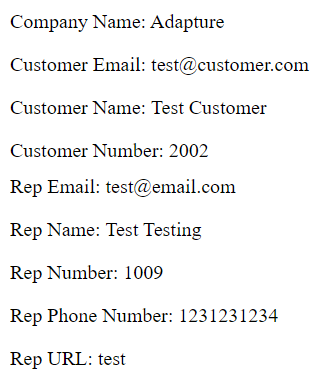
The following image is an example of the information that will be sent for each field tag for the Customer Signup - Welcome Email Autoresponder:
¶ Supported Delivery Types
The following delivery types are supported by this Autoresponder:
- Email: Yes
- Revolution Alert: Yes
- WebHook: Yes
¶ Supported Triggering Events
The following events and actions will trigger this Autoresponder to send:
- Rep Enrollment Form Completion
- Shopping Cart Rep Enrollment Completion
- OnlineAPI::CreateRep, OnlineAPI::CreateRep_V2, OnlineAPI::GenereateAR
- Manual Generation in Backoffice under Rep > Reports > AutoResponders