¶ Guest Checkout
The Shopping Cart "Guest Checkout" feature enables the ability for Shopping Cart users to place orders without having to create an account or login to an existing account. This is useful for Customers who do not wish to create a Customer Account but still wish to place orders.
Please be aware that is a different feature from Blind Shopping, which allows a Shopping Cart user to shop under a specified Rep without ever having to choose one or be assigned one.
¶ Usage
While in the Shopping Cart and signed out of any accounts, upon clicking your Cart and entering the Shopping Cart Bag Summary page, there is a prompt to continue as a guest offered as an alternative to clicking Checkout and getting prompted to create an Account as usual.
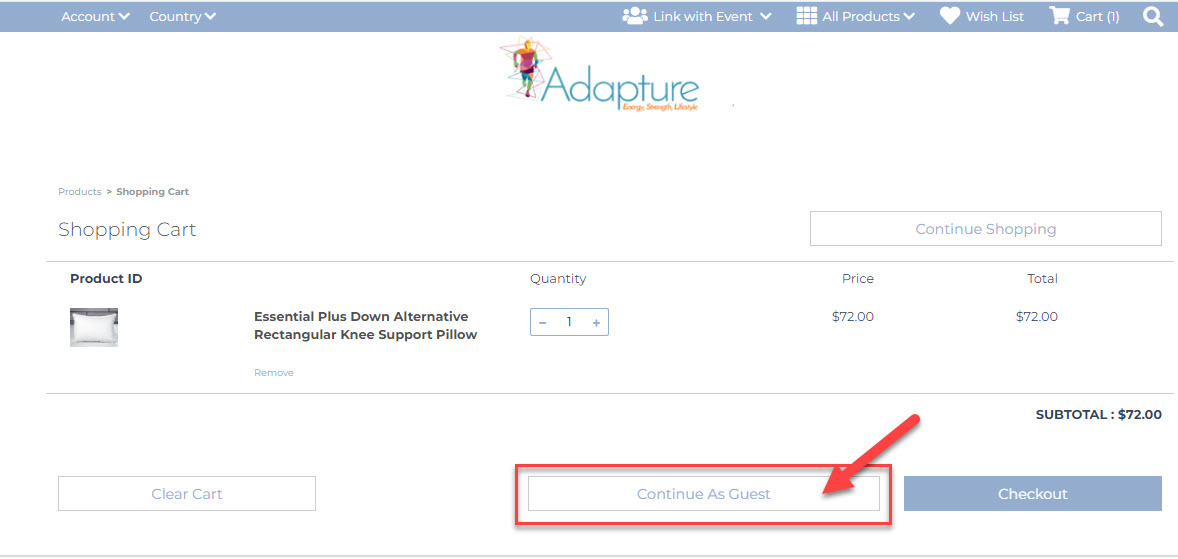
Checking out in this fashion will place the Order under the CustomerDID specified on the Freedom Setting JSCART_GUEST_CUSTOMERDID referenced in the Configuration section of this Document.
¶ Configuration
JSCART_GUEST_CUSTOMERDID - This setting enables the feature by entering a customer display ID that will be used to place guest orders.
Note: This is also a Territory Based Setting and must use a Customer account for each Territory assocciated with the same Territory\country when multiple Territories\countries are in use. Further, this feature works in conjunction with "Blind Shopping" and must be in use for it to trigger guest checkout feature.
¶ Relevant Translation Keys
- USE_SHIPPING_ADDRESS
- CLIENTCART_JSCART_CONTINUE_AS_GUEST
¶ Guest Checkout AutoResponders
The following AutoResponders have the ability to be configured\created to trigger an email containing the Guest details from the Order Details instead of the Guest Customer Account Profile used to place the order by setting the "Autoresponder Recipient" field to "Customer Info from Order".
Customer Order - Email To Customer
Customer Order - Email To Owner Rep
Customer Order - Email to Upline
Product Specific Customer Order - Email to Customer/Sponsoring Rep