The Inventory Import tool allows you to upload new inventory items in bulk by using CSV files where each line represents the type of change requested as well as the required data for the update.
¶ Inventory Import Basics
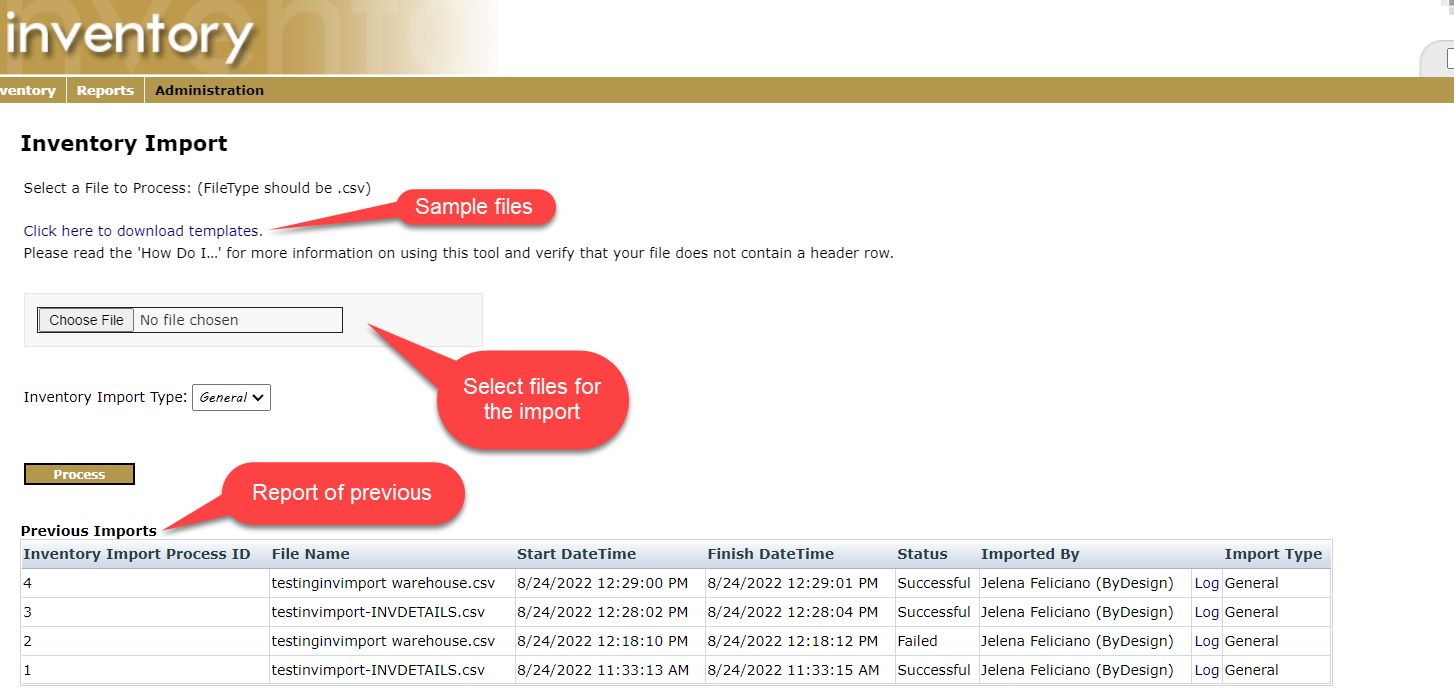
The Inventory Import tool can be accessed from the Inventory Department.
Departments > Inventory > Administration > Inventory Import
The page provides a set of sample files, Import selection, and a report of the prior import attempts with links to the prior import files.
¶ Templates (CSV files)
These are the templates to use when creating the upload files:
exampletestfileswithheaders.zip
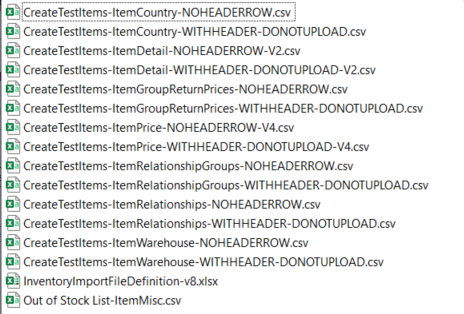
Note that some of these files are named with WITHHEADER. These should not be used to upload. They are provided to clearly show what each column means. If you do want to use this as your upload file, then you will need to delete the column header row.
¶ Record Types
The beginning of each template file contains a Record Type column. Record Types are used to define the type of file being imported.
Example:

The Record types for the Imported files are as follows:
- ItemDetail
- ItemPrice: Avoid using currency symbols. The system will ignore the data entered with unexpected characters.
- ItemWarehouse
- ItemCountry
- ItemMisc (optional): Depending on the available Misc fields this file may be different. UnitOfMeasure is typically the only field listed.
- ItemGroupReturnPrices (optional)
- ItemRelationshipGroups (optional)
- ItemRelationships (optional)
Whether these uploaded files will update exiting records is controlled by the InventoryImport_Update_Existing freedom settings. When this setting is enabled, certain data points can be overwritten for specific Record Types. (see Freedom Settings below)
¶ Import File
The import file that you intend to upload can contain mixed record types. For example, in the same import file you could add items and their prices.
Although, it is easier to troubleshoot issues if you upload each file separately.
Upload the files in this order to Create New Items:
- ItemDetail, This must be completed before any other steps as it will create the inventory item that all subsequent uploads must reference.
- ItemPrice
- ItemWarehouse
- ItemCountry
The files being uploaded cannot have a header row!
Each Record Type has its own specifications and behaviors that are important to understand. Additionally, there are a few freedoms settings that can alter some of these behaviors that are important to review and understand prior to using the import tool.
It's important to note that the import tool does NOT provide a mechanism to reverse a prior import or delete items directly. Therefore, when running an import, it is recommended to create a smaller file with samples of the changes you wish to make for the first import. This will allow for testing to confirm that the import will perform as expected before the full-scale import.
¶ Freedom Settings:
- INVENTORYIMPORT_UPDATE_EXISTING setting (checkbox)
- Enabled, allows the imported file to update existing records.
- Disabled, will check for an existing item and won't update the existing item, thus preventing the inventory import from running.
- InventoryImport_InvPrices_StartDate setting (field)
- The value in this setting will be the value of the InventoryPrices StartDate (mm/dd/yyyy). Default value is 01/01/2000.
- InventoryImport_InvPrices_EndDate setting (field)
- The value in this setting will be the value of the InventoryPrices EndDate (mm/dd/yyyy). Default value is 12/31/9999.